
Callbacks in JavaScript: Why They Exist

Callbacks in JavaScript
The simplest definition: A callback is just a function you pass to another function, so it can be called later.
Why do they exist?
JavaScript does one thing at a time. But some tasks take time — like fetching data, reading a file, or waiting 3 seconds.
Without callbacks, JavaScript would freeze and wait. With callbacks, it says:
"Go do that slow thing, and when you're done — call this function."
Real-life analogy
Imagine you order a pizza. You don't stand at the door staring until it arrives. You go watch TV, and when the doorbell rings — that's the callback.
The doorbell = the callback function being called when the task is done.
Simple code example
js
function greet(name) {
  console.log("Hello, " + name);
}

function processUser(callback) {
  let name = "Alice";
  callback(name);  // calling the function you passed in
}

processUser(greet);  // passing greet as a callback
// Output: Hello, Alice
greet is passed as an argument and called inside another function. That's it. That's a callback.
A timing example (closer to real use)
js
console.log("Start");

setTimeout(function () {
  console.log("I ran after 2 seconds");  // this is the callback
}, 2000);

console.log("End");

// Output:
// Start
// End
// I ran after 2 seconds ← callback fired later
JavaScript didn't freeze for 2 seconds. It kept going and came back when the timer was done.
Callbacks in Async Programming
1. Why callbacks are used in Asynchronous Programming
The problem: JavaScript runs line by line. Some tasks are slow (API calls, file reading, timers). If JS waited for each one — the whole page would freeze.
The solution: Do the slow task in the background, and when it's done — run the callback.
console.log("1. Order placed");

setTimeout(function() {
  console.log("2. Pizza delivered!");  // runs after 3 seconds
}, 3000);

console.log("3. Watching TV");

// Output:
// 1. Order placed
// 3. Watching TV
// 2. Pizza delivered!   ← came later, didn't block anything
JS didn't wait. It moved on and came back when the slow task finished.
2. Passing Functions as Arguments
In JavaScript, functions are like values — just like numbers or strings. You can pass them around.
// A normal value being passed
function double(num) {
  return num * 2;
}

// A function being passed as argument
function runIt(fn) {
  fn();  // calling whatever function was passed
}

function sayHi() {
  console.log("Hi there!");
}

runIt(sayHi);  // Output: Hi there!
Three ways to pass a callback:
// Way 1 - Named function
function greet() { console.log("Hello!"); }
btn.addEventListener("click", greet);

// Way 2 - Anonymous function
btn.addEventListener("click", function() {
  console.log("Hello!");
});

// Way 3 - Arrow function
btn.addEventListener("click", () => {
  console.log("Hello!");
});
All three do the same thing — just different styles.
3. Callback Usage in Common Scenarios
Scenario 1 — Click Events
document.getElementById("btn").addEventListener("click", function() {
  console.log("Button was clicked!");
  // ↑ this runs ONLY when user clicks, not before
});
Scenario 2 — setTimeout / setInterval
// Run once after delay
setTimeout(function() {
  console.log("Runs after 2 seconds");
}, 2000);

// Run repeatedly
setInterval(function() {
  console.log("Runs every 1 second");
}, 1000);
Scenario 3 — Array Methods
const numbers = [1, 2, 3, 4, 5];

// forEach - do something with each item
numbers.forEach(function(num) {
  console.log(num * 2);  // 2, 4, 6, 8, 10
});

// filter - keep only what passes the test
const evens = numbers.filter(function(num) {
  return num % 2 === 0;  // [2, 4]
});

// map - transform every item
const doubled = numbers.map(function(num) {
  return num * 2;  // [2, 4, 6, 8, 10]
});
Scenario 4 — Fetching Data (most common real use)
fetch("https://api.example.com/user")
  .then(function(response) {   // ← callback: runs when data arrives
    return response.json();
  })
  .then(function(data) {       // ← callback: runs after parsing
    console.log(data);
  });

console.log("This runs first, before data arrives!");
Quick Summary Table
| Scenario | What the callback does |
|---|---|
addEventListener |
Runs when user does something |
setTimeout |
Runs after time is up |
forEach / map / filter |
Runs for each item in array |
fetch / .then() |
Runs when server data arrives |
Golden rule: Anytime something takes time or waits for something — a callback is there to say "run this when ready."
Diagram 1 shows how a regular function calls a callback — the basic pattern explained step by step.
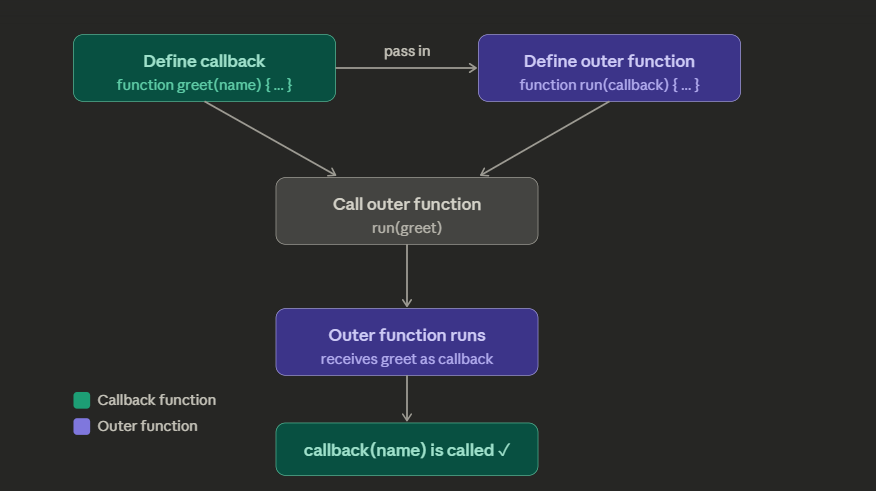
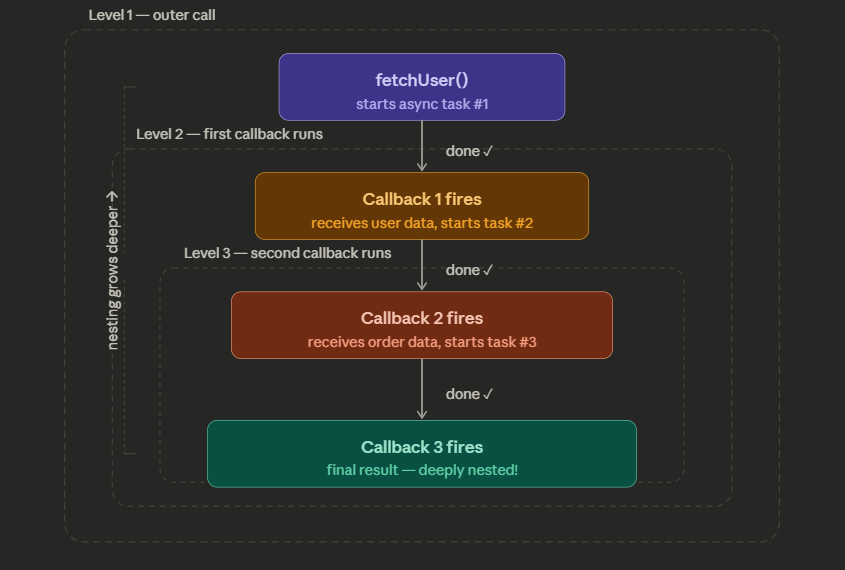
Diagram 2 shows nested callbacks — what happens when callbacks are placed inside callbacks (this is where it starts looking messy, often called "callback hell").
Promises — The Solution to Callback Hell
A Promise is JavaScript's way of saying: "I don't have the result yet, but I promise I'll get back to you."
Instead of nesting callbacks inside callbacks, Promises let you chain steps in a flat, readable line.
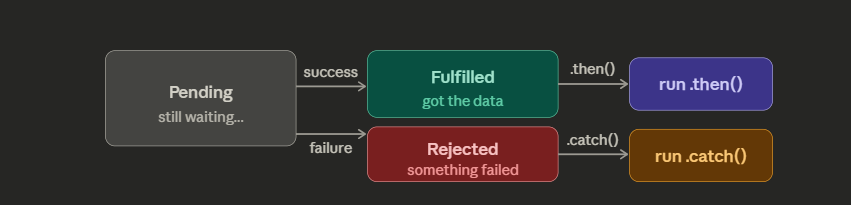
The 3 states of a Promise
A Promise is always in one of these states:
First, the 3 states a Promise can be in
Now here's Callbacks vs Promises side by side — the exact same task written both ways so you can feel the difference:
// CALLBACKS — pyramid of doom
fetchUser(function(user) {
  fetchOrders(user.id, function(orders) {
    fetchDetails(orders[0], function(details) {
      console.log(details); // buried 3 levels deep!
    });
  });
});

// PROMISES — flat chain
fetchUser()
  .then(function(user)    { return fetchOrders(user.id); })
  .then(function(orders)  { return fetchDetails(orders[0]); })
  .then(function(details) { console.log(details); })
  .catch(function(error)  { console.log("Something failed:", error); });
Same steps, but Promises read top to bottom like a simple list. No pyramid. And .catch() handles errors from any step — you don't need to check for errors inside every single callback.
async/await — Promises with an even cleaner face
async/await is just Promises in disguise. It makes async code look like normal, step-by-step code:
async function getDetails() {
  try {
    const user    = await fetchUser();        // wait here
    const orders  = await fetchOrders(user.id); // then here
    const details = await fetchDetails(orders[0]); // then here
    console.log(details);
  } catch (error) {
    console.log("Something failed:", error);
  }
}
await tells JavaScript: "pause here until this Promise finishes, then continue." It feels like normal synchronous code — but it's still async underneath.
The full evolution at a glance
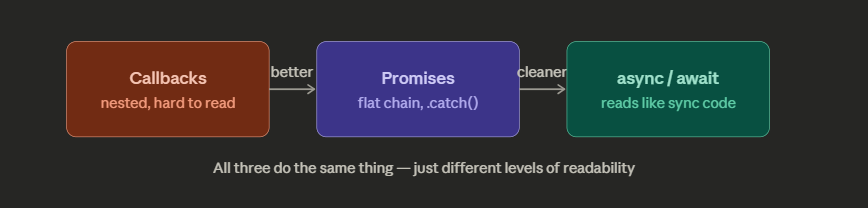
In modern JavaScript, async/await is what most people use today. But under the hood, it's still Promises — and Promises are still just a better way to manage callbacks. So understanding callbacks first made all of this click into place.


