
Async/Await in JavaScript: Writing Cleaner Asynchronous Code
The Problem Before async/await
Imagine you're at a restaurant. You order food, and instead of waiting at the counter blocking everyone behind you, you sit down and the waiter brings it when it's ready. That's async programming.
But here's the issue — before async/await, handling this in JavaScript looked like this:
js
getUser(id, function(user) {
  getOrders(user, function(orders) {
    getDetails(orders[0], function(details) {
      console.log(details); // deeply nested mess
    });
  });
});
This was called "callback hell" — deeply nested, hard to read, hard to debug.
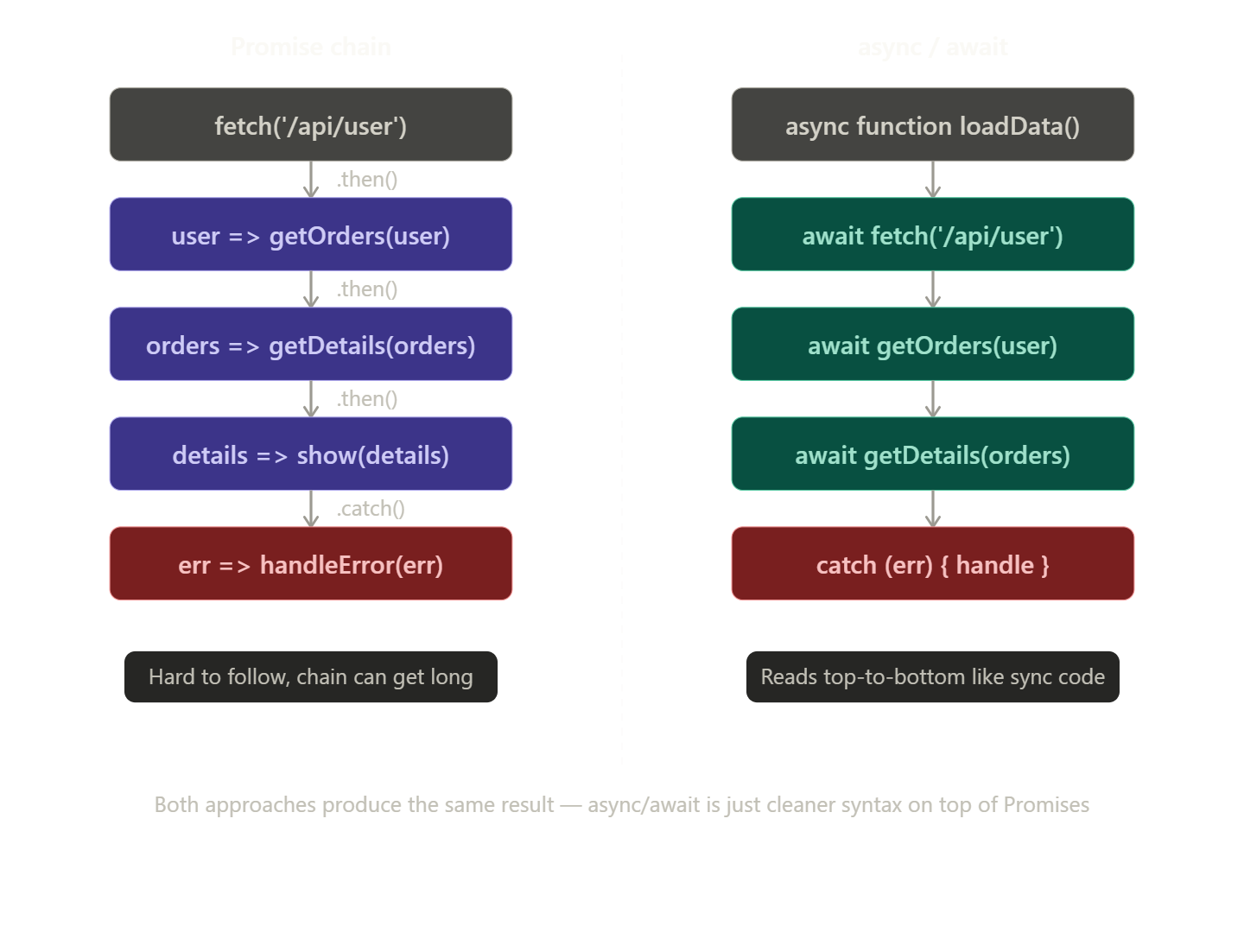
Then came Promises, which were better, but still verbose:
js
getUser(id)
  .then(user => getOrders(user))
  .then(orders => getDetails(orders[0]))
  .then(details => console.log(details))
  .catch(err => console.error(err));
Payment Processing — Real World Example
Imagine you're buying something on Amazon. You click "Place Order" and pay with your card. Here's everything that happens behind the scenes — and how async/await makes it manageable.
The Real World Flow
You → Amazon → Payment Gateway → Bank → Response → Amazon → You
Each step takes time and can fail independently. This is a perfect case for async/await.
The Code
js
async function processPayment(order, cardDetails) {

  // Step 1: Validate the card format
  console.log("Validating card...");
  const isValid = await validateCard(cardDetails);
  if (!isValid) {
    throw new Error("Invalid card details");
  }

  // Step 2: Check if user has enough balance (talks to the bank)
  console.log("Checking balance with bank...");
  const hasFunds = await checkBalance(cardDetails, order.amount);
  if (!hasFunds) {
    throw new Error("Insufficient funds");
  }

  // Step 3: Freeze/reserve the amount (authorization)
  console.log("Authorizing payment...");
  const authCode = await authorizePayment(cardDetails, order.amount);

  // Step 4: Actually move the money (capture)
  console.log("Capturing payment...");
  const receipt = await capturePayment(authCode);

  // Step 5: Notify the seller
  await notifySeller(order.sellerId, receipt);

  // Step 6: Send confirmation email to user
  await sendConfirmationEmail(order.userId, receipt);

  return receipt;
}
Calling It (with error handling)
js
async function placeOrder(cartItems, cardDetails) {
  try {
    const order = await createOrder(cartItems);       // Build the order
    const receipt = await processPayment(order, cardDetails); // Pay

    console.log("✅ Order placed!", receipt.id);
  } catch (error) {
    console.error("❌ Payment failed:", error.message);
    await refundIfNeeded();   // Rollback if something went wrong midway
  }
}
Why Each Step Needs await
| Step | Why it takes time |
|---|---|
validateCard |
Checks format + calls fraud detection API |
checkBalance |
Talks to your bank's server |
authorizePayment |
Bank reserves the money temporarily |
capturePayment |
Money actually moves between accounts |
notifySeller |
Hits the seller's system |
sendConfirmationEmail |
Email service API call |
Each of these could take 100ms to 2 seconds. Without await, you'd try to capture payment before authorization even finished — chaos.
What Happens If You Skip await?
js
// ❌ WRONG — no await
const authCode = authorizePayment(cardDetails, order.amount);
const receipt = capturePayment(authCode); // authCode is a Promise, not a real code!
You'd pass a Promise object instead of the actual authorization code to the bank — the payment would fail or behave unpredictably.
The Big Picture
In payment processing, order strictly matters — you can't capture before authorizing, can't authorize before checking balance.
async/awaitenforces this sequence cleanly, while still being non-blocking so your server can handle other users' requests at the same time.
That's exactly why async/await exists — real-world operations like payments are sequential, time-consuming, and failure-prone, and async/await handles all three gracefully.
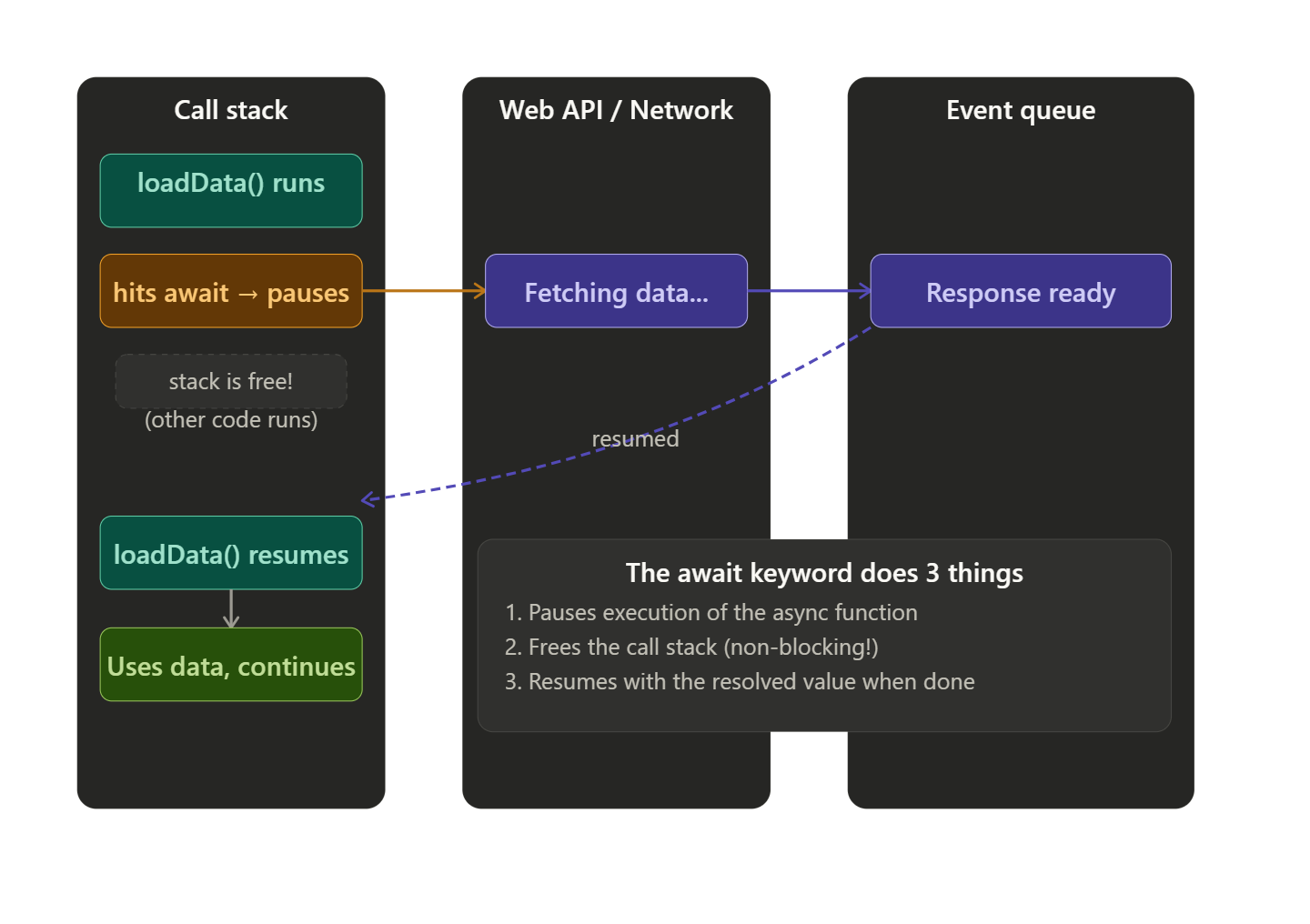
Now let's look at how the await keyword actually works inside an async function — what happens at each pause point.
Now here's an interactive guide covering all three topics — await, error handling, and the Promise comparison — with code examples you can explore.
Here's a quick summary of the three concepts:
The await keyword — pauses the async function, frees the call stack, then resumes with the resolved value. You get the actual data, not a Promise object.
Error handling — use try/catch/finally just like synchronous code. One try block catches errors from all await calls inside it — much cleaner than chaining .catch() everywhere.
vs Promises — async/await is Promises under the hood. The big win is readability: top-to-bottom flow instead of chained callbacks. But raw Promises still shine for parallel execution with Promise.all().


