Array Methods You Must Know

JavaScript Array Methods Explained Simply
Arrays help store multiple values in one variable. JavaScript provides many built-in methods to manipulate arrays easily.
In this guide we will learn:
push()pop()shift()unshift()map()filter()reduce()(basic)forEach()
1. push() Method
What it does
push() adds a new element to the end of an array.
Real-world example
Imagine a movie watchlist where you keep adding movies to watch.
Before Array
["Inception", "Interstellar", "Avatar"]
Code Example
let watchlist = ["Inception", "Interstellar", "Avatar"];

watchlist.push("Dune");

console.log(watchlist);
After Array
["Inception", "Interstellar", "Avatar", "Dune"]
Why use push()
Easy way to add data
Keeps order of elements
Pros and Cons
| Pros | Cons |
|---|---|
| Simple syntax | Only adds at end |
| Fast operation | Cannot insert in middle |
2. pop() Method
What it does
pop() removes the last element of an array.
Real-world example
Imagine a playlist queue where the last song is removed.
Before Array
["Song A", "Song B", "Song C"]
Code Example
let playlist = ["Song A", "Song B", "Song C"];

playlist.pop();

console.log(playlist);
After Array
["Song A", "Song B"]
3. shift() Method
What it does
shift() removes the first element from an array.
Real-world example
A support ticket queue where the first request is processed.
Before Array
["Ticket1", "Ticket2", "Ticket3"]
Code
let tickets = ["Ticket1", "Ticket2", "Ticket3"];

tickets.shift();

console.log(tickets);
After Array
["Ticket2", "Ticket3"]
4. unshift() Method
What it does
Adds a new element to the beginning of an array.
Real-world example
A breaking news list where urgent news appears first.
Before
["Weather Update", "Sports Update"]
Code
let news = ["Weather Update", "Sports Update"];

news.unshift("Breaking News");

console.log(news);
After
["Breaking News", "Weather Update", "Sports Update"]
5. map() Method
What it does
map() creates a new array by transforming every element.
Real-world example
Convert video durations from minutes to seconds.
Before
[2, 5, 10]
Code Example
let minutes = [2, 5, 10];

let seconds = minutes.map(function(time){
    return time * 60;
});

console.log(seconds);
After
[120, 300, 600]
Flowchart: How map() Works
Original Array
   ↓
[2,5,10]
   ↓
Function runs for each value
   ↓
2*60 → 120
5*60 → 300
10*60 → 600
   ↓
New Array
[120,300,600]
map() vs Traditional for Loop
Using for loop
let minutes = [2,5,10];
let seconds = [];

for(let i=0; i<minutes.length; i++){
    seconds.push(minutes[i] * 60);
}
Using map()
let seconds = minutes.map(function(time){
 return time * 60;
});
Comparison
| Feature | for loop | map() |
|---|---|---|
| Code length | Longer | Shorter |
| Readability | Medium | High |
| Creates new array | Manual | Automatic |
6. filter() Method
What it does
filter() returns only elements that match a condition.
Real-world example
Filter temperatures above 30°C.
Before
[25, 32, 18, 35, 29]
Code
let temperatures = [25, 32, 18, 35, 29];

let hotDays = temperatures.filter(function(temp){
   return temp > 30;
});

console.log(hotDays);
After
[32, 35]
Flowchart: How filter() Works
Array
[25,32,18,35,29]

Check condition (>30)

25 ❌
32 ✔
18 ❌
35 ✔
29 ❌

Result
[32,35]
7. reduce() Method (Beginner Explanation)
What it does
reduce() combines all array values into a single value.
Real-world example
Calculate total shopping cost.
Before
[120, 80, 50]
Code
let prices = [120, 80, 50];

let total = prices.reduce(function(sum, price){
    return sum + price;
},0);

console.log(total);
Result
250
Simple Visual
Step 1
0 + 120 = 120

Step 2
120 + 80 = 200

Step 3
200 + 50 = 250
Final result → 250
8. forEach() Method
What it does
forEach() runs a function for every element in an array.
Real-world example
Display a list of tasks.
Code
let tasks = ["Update website", "Backup database", "Send newsletter"];

tasks.forEach(function(task){
    console.log(task);
});
Output
Update website
Backup database
Send newsletter
Important
forEach() does not create a new array.
Encourage Students to Try in Console
Open browser console and try:
F12 → Console
Example:
let numbers = [5,10,15];
numbers.map(n => n*2);
Practice helps understand array behavior faster.
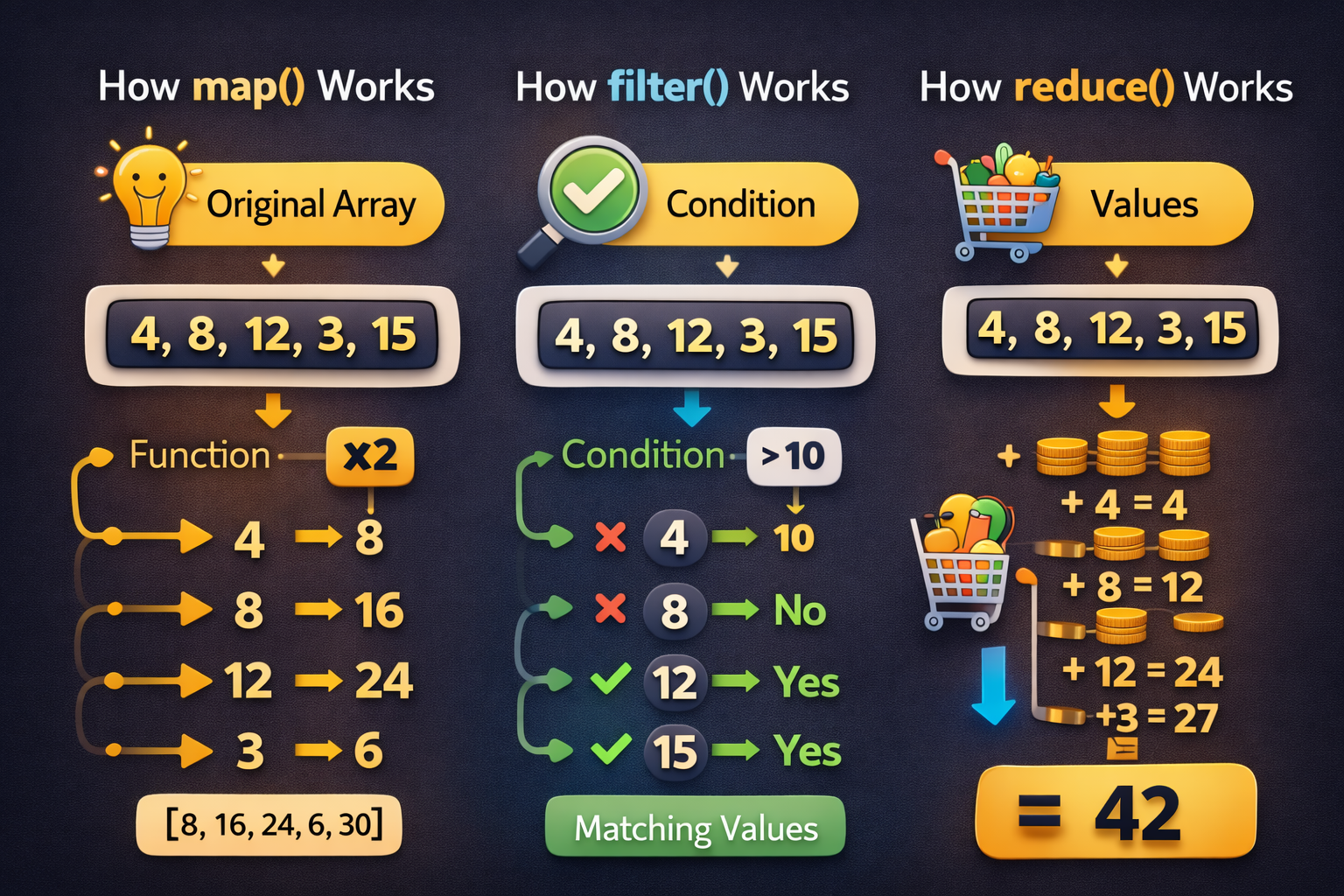
1. map() Example (Transform Values)
Goal
Double every number in the array.
let numbers = [4, 8, 12, 3, 15];

let doubled = numbers.map(function(num){
  return num * 2;
});

console.log(doubled);
Result
[8, 16, 24, 6, 30]
Table Explanation
| Index | Original Value | Operation | Result |
|---|---|---|---|
| 0 | 4 | 4 × 2 | 8 |
| 1 | 8 | 8 × 2 | 16 |
| 2 | 12 | 12 × 2 | 24 |
| 3 | 3 | 3 × 2 | 6 |
| 4 | 15 | 15 × 2 | 30 |
Final Array
[8, 16, 24, 6, 30]
Key Point
map()returns a new arrayIt transforms each element
2. filter() Example (Select Values)
Goal
Get numbers greater than 10
let numbers = [4, 8, 12, 3, 15];

let bigNumbers = numbers.filter(function(num){
  return num > 10;
});

console.log(bigNumbers);
Result
[12, 15]
Table Explanation
| Index | Value | Condition (>10) | Included in Result |
|---|---|---|---|
| 0 | 4 | ❌ No | No |
| 1 | 8 | ❌ No | No |
| 2 | 12 | ✅ Yes | 12 |
| 3 | 3 | ❌ No | No |
| 4 | 15 | ✅ Yes | 15 |
Final Array
[12, 15]
Key Point
filter()returns only matching elementsOriginal array remains unchanged
3. reduce() Example (Combine Values)
Goal
Calculate total sum
let numbers = [4, 8, 12, 3, 15];

let total = numbers.reduce(function(sum, num){
  return sum + num;
}, 0);

console.log(total);
Result
42
Table Explanation
| Step | Current Sum | Current Value | Calculation | New Sum |
|---|---|---|---|---|
| 1 | 0 | 4 | 0 + 4 | 4 |
| 2 | 4 | 8 | 4 + 8 | 12 |
| 3 | 12 | 12 | 12 + 12 | 24 |
| 4 | 24 | 3 | 24 + 3 | 27 |
| 5 | 27 | 15 | 27 + 15 | 42 |
Final Result
42
Key Point
reduce()returns a single valueUsed for sum, total, average, etc
Visual Comparison Table
| Method | Purpose | Returns | Example Result |
|---|---|---|---|
| map() | Transform values | New Array | [8,16,24,6,30] |
| filter() | Select values | New Array | [12,15] |
| reduce() | Combine values | Single Value | 42 |
Simple Real-World Example
Suppose this array represents daily walking steps (thousands):
[4, 8, 12, 3, 15]
| Method | Example Use |
|---|---|
| map() | Convert thousands to actual steps |
| filter() | Find days with steps > 10k |
| reduce() | Calculate total steps |